- Why „personalize at scale“ is usually a contradiction
- The 4 levels of LinkedIn message personalization
- The 5-step workflow to hit Level 3 in 90 seconds per message
- Where to find the personalization hook in 30 seconds
- Template architecture that supports personalization
- Tools that help vs tools that hurt
- The daily routine that compounds
- When to deviate from the script
- Frequently asked questions
Every LinkedIn sales course says the same thing: „personalize your outreach.“ Then the same courses suggest you handle it with either ChatGPT or an automation suite — both of which produce worse results than no personalization at all, in my experience. Personalization at scale is achievable. It just looks nothing like what AI-content tools are selling.
Why „personalize at scale“ is usually a contradiction
The phrase implodes the moment you try to execute it. AI message-writers produce text that looks personalized but isn’t — the prospect can tell. Automation tools blast templates with first-name tokens at volume, which scales but isn’t personalization. Both lift the number of messages sent and crash the reply rate. The metric you care about is conversations, not sends — and the math gets worse fast as send-quality drops.
I’ve tested every major AI model — Claude, ChatGPT, Gemini — for generating LinkedIn DMs. With a generic prompt („write a connection request to this prospect“), the output is universally bad: corporate, vague, immediately spotted as AI. It only works if you write a prompt so detailed that you may as well have written the message yourself. At which point the AI isn’t saving you time, it’s the inverse.
The 4 levels of LinkedIn message personalization
Personalization is not binary. There are roughly four levels, each with a predictable reply-rate band based on outreach data from my own campaigns and public benchmarks.
| Level | Approach | Time per msg | Reply rate |
|---|---|---|---|
| 0 — None | Generic template, no tokens | 5s | 4–7% |
| 1 — First name | „Hi {first}“ only | 10s | 8–12% |
| 2 — Context | {first} + {company} + {role} | 30s | 15–25% |
| 3 — Specific reference | + one line about a post, project, or mutual | 90s | 30%+ |
Level 3 is where the math works. At 100 messages per week, you’re getting 30 replies. At Level 1, you’d need 300 messages to hit the same 30 replies — and 300 messages a week is exactly where the account-restriction zone starts.
The 5-step workflow to hit Level 3 in 90 seconds per message
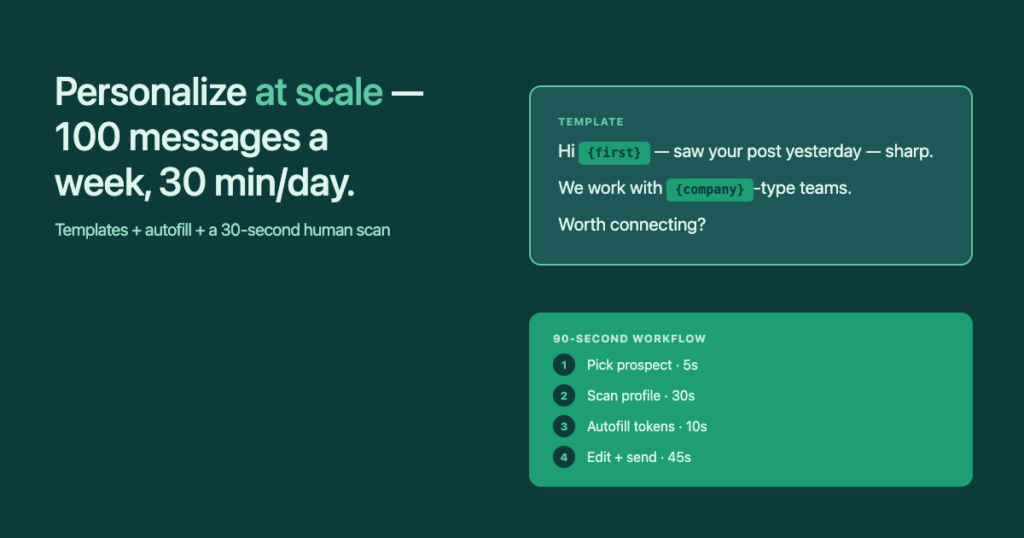
The first time you try this it feels slow. By message twenty it’s automatic. The trick is having every artefact (template, lead list, autofill tool) ready before you start — so the only cognitive load per message is the 30-second profile scan.
| Step | Action | Time |
|---|---|---|
| 1 | Pick prospect from curated list | 5s |
| 2 | Scan profile for one personalization hook | 30s |
| 3 | Open saved template; autofill tokens | 10s |
| 4 | Edit the one personalization line | 30s |
| 5 | Review and click Send manually | 15s |
| Total | — | 90s |
Run that workflow for 30 minutes a day and you hit 20 Level-3 messages, which is 100 a week at five working days. That’s the volume where the math compounds without the account risk.
Where to find the personalization hook in 30 seconds
The hook is not a deep biographical reference. It’s one fact, specific enough that no other outreach message in their inbox could have written it. Five places to look, in this order:
- Their most recent post or comment. „Saw your post on X yesterday — the part about Y stuck with me.“ Highest hit rate.
- The Featured section. Pinned content tells you what they care about most right now.
- The banner image. If it has a tagline or a product name, that’s a fact you can use.
- Mutual connections. Only if the mutual is genuine and recent — not a LinkedIn influencer with 30k connections.
- Recent role change or work anniversary. The badge LinkedIn slaps on profiles is free hook material.
Template architecture that supports personalization
The template is the scaffold. The personalization is the insertion. Fix the scaffold, vary the insertion. Here’s what a Level-3 connection request template looks like:
Hi {first} — {one-line specific reference}.
We're working on something at {company} I think you'd find interesting (no pitch, promise).
Worth connecting?
Three fixed lines, one variable line. The fixed lines are A/B-testable: I’ve run the same scaffold across 200 prospects, then changed one fixed line and run another 200. That’s how you learn what’s really moving the needle. AI-generated messages can’t be tested this way because no two are the same.
InFilly reads the LinkedIn profile you’re on and fills {first}, {company}, {title} on your saved template in one click. The 10-second step in the 90-second workflow. No automation, no account risk.
Tools that help vs tools that hurt
| Tool category | Helps Level-3 personalization? | Why |
|---|---|---|
| Autofill (InFilly, TextExpander) | Yes | Eliminates the 30s typing tax per message |
| Lead finder (Apollo, Hunter) | Yes | Pre-qualified list = better hook material per profile |
| Sales Navigator | Yes | Profile-data-rich search results |
| AI message-writer | No | Removes the human reasoning that makes the hook specific |
| Sending automation | No | Forces Level 1 max (volume game) |
| Generic CRMs | Neutral | Tracks the output, doesn’t help create it |
The honest counterintuitive call: AI tools, sold as the future of personalization, are actually the biggest threat to Level-3 reply rates. The reason is that they remove the only thing that produces a Level-3 message — a human reading a specific profile and writing a specific reference. Once the human is out of the loop, even the best AI defaults toward generic output.
The daily routine that compounds
- Monday — Friday, 09:00–09:30. Pick 20 prospects from yesterday’s curated list.
- Per prospect: 90 seconds. Scan, autofill, write the one personal line, send manually.
- Weekly total: ~100 Level-3 personalized sends, expected 30 replies, expected 5–8 booked calls.
I’ve run this exact routine for years, across my own outreach and my agency clients‘. The numbers are remarkably stable. The variance comes from your list quality (Step 1) and the specificity of your hook (Step 2), not from the template or the autofill — those are commodities.
When to deviate from the script
The 90-second workflow is for cold connection requests and welcome messages — the high-volume, top-of-funnel work. Two cases where you should deviate:
- Inbound replies. When a prospect responds, throw away the template. The conversation is now specific; treat it as a conversation, not a campaign.
- Named accounts. If a deal is worth $50k+, write the message from scratch. Spend 15 minutes on the research instead of 30 seconds.
For everything in between — the bulk of top-of-funnel outreach — the 90-second workflow is the right tool. Stick with it.