- Why LinkedIn lead generation works in 2026 (and why most people get it wrong)
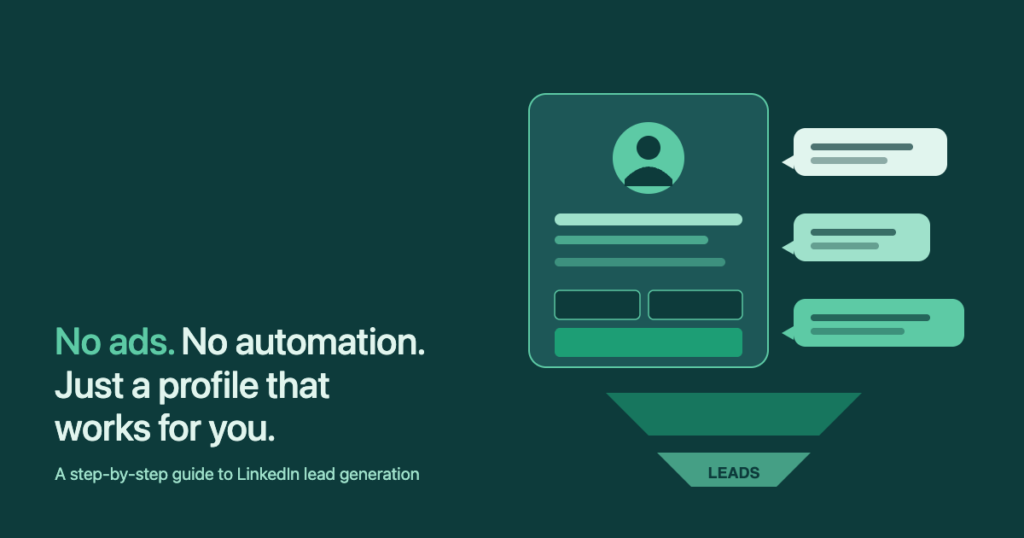
- The LinkedIn lead generation funnel without ads (overview)
- Step 1 — Build a profile that converts visitors into leads
- Step 2 — Find your ideal customers (without Sales Navigator)
- Step 3 — Post content that pulls leads to you
- Step 4 — Send connection requests that get accepted
- Step 5 — Turn connections into conversations
- Step 6 — Track what works (without real analytics)
- Common mistakes that kill LinkedIn lead generation
- Frequently asked questions
I’ve generated multiple six figures in revenue through LinkedIn — 100% manually, zero paid ads, zero automation. So has every client I’ve helped do the same. The playbook is not a secret. It’s a profile that does the heavy lifting, three posts a week, and 30 minutes of manual outreach a day. The reason most people don’t see results is not the tactics — it’s that they stop after week two, or they try to shortcut step one with an automation tool and get their account restricted.
Why LinkedIn lead generation works in 2026 (and why most people get it wrong)
LinkedIn generates roughly 80% of all B2B leads coming from social media, and 89% of B2B marketers actively use it for lead generation. With 1.3 billion members, it is the only platform where you can find the exact decision-maker for almost any B2B product and reach them in their own inbox without paying for an ad.
The reason most guides get this wrong: they jump straight to paid Lead Gen Forms or an automation suite that promises „200 personalized messages a day.“ Both miss the point. Paid forms convert well (around 13%) but cost $50–$130 per lead. Automation gets your account flagged the moment LinkedIn detects unnatural behavior. The middle path — manual, consistent, personalized outreach from a strong profile — is what actually compounds.
One number to keep in your head: inbound LinkedIn leads convert at 14.6%; cold outreach leads convert at 1.7%. Roughly 8x the conversion rate. That is the entire reason this guide spends as much time on your profile and content as on the outreach itself — the inbound flywheel is where the math actually works.
The LinkedIn lead generation funnel without ads (overview)
Three layers, each feeding the next. Top of funnel = your content earns attention. Middle = engagement (likes, comments, profile visits) warms up the audience. Bottom = 1:1 outreach turns the warmed audience into actual conversations.
| Funnel stage | Activity | Daily time | What it produces |
|---|---|---|---|
| Top — Awareness | 3 posts/week + 5–10 thoughtful comments/day on prospects‘ posts | 20 min | Profile views, follow requests, inbound DMs |
| Middle — Warming | Accept relevant connections, send welcome messages | 5 min | Conversations started, replies in inbox |
| Bottom — Outreach | 20 new connection requests/day with a 1-line personal note | 10 min | ~7 new connections accepted/day at 37% rate |
That’s 35 minutes a day, five days a week. No automation, no Sales Navigator, no paid ads. Now let’s break each step down.
Step 1 — Build a profile that converts visitors into leads
Every connection request you send triggers a profile visit. Every comment you leave on someone else’s post drives a profile visit. Every post you publish drives profile visits. Your profile is the page that converts visitors into followers, conversations, and leads. Get it right before you do anything else.
The headline (220 characters)
Skip the „CEO at Company X“ default. Use this formula: „I help [specific audience] [achieve specific outcome] without [common pain]“. Specific beats clever every time.
I help {audience} {outcome} — without {pain}.
Founder of {company}. Previously {credential}.
The About-section (first 3 lines matter most)
LinkedIn truncates the About-section after roughly 250 characters with a „…see more“ link. Treat those first three lines as a billboard: who you serve, what you do, why anyone should care. The rest of the section can be longer-form story.
The Featured section (your de-facto landing page)
- Pin a high-performing post that demonstrates expertise — the same one you’d send to a prospect as a credibility proof.
- Add a direct link to a free resource (template pack, checklist, mini-guide) with a one-line CTA above it.
- Add a „book a call“ link as the third item — only after the first two have done the qualifying.
The banner
A clean banner with a single sentence value proposition outperforms any stock photo. The banner is the largest piece of visual real estate on your profile — don’t waste it on a beach photo.
Step 2 — Find your ideal customers (without Sales Navigator)
Sales Navigator is genuinely good. It also costs $119.99/month and most solopreneurs and bootstrapped founders don’t need it on day one. Free LinkedIn gives you about 80% of the prospecting capability if you understand Boolean search and accept some friction.
Boolean search on free LinkedIn
("Head of" OR "Director" OR "VP") AND "marketing" NOT "agency"— targets in-house marketing leaders only.- Combine with Location and Industry filters in the left rail.
- The free plan caps you at ~100 profile results per query, so narrow ruthlessly.
Free LinkedIn vs Sales Navigator vs Sales Navigator Advanced
| Feature | Free | Sales Nav Core | Sales Nav Advanced |
|---|---|---|---|
| Search filters | ~10 basic | 30+ advanced | 30+ advanced |
| Results per query | ~100 | 2,500 | 2,500 |
| Saved lead lists | No | Yes | Yes |
| InMail credits/mo | 0 | 50 | 50 |
| CRM sync | No | No | Yes |
| Price | $0 | $119.99/mo | $159.99/mo |
| Best for | Founders < 50 leads/mo | Active sales > 50 leads/mo | Sales teams w/ CRM |
My honest take: if you’re early, start free. Move to Sales Nav Core once you’re consistently sending 50+ connection requests per week and the search limit becomes the bottleneck. Advanced is overkill unless you’re running a sales team with a CRM.
Step 3 — Post content that pulls leads to you
Inbound is where the conversion math turns in your favor (14.6% vs 1.7% for cold). Three posts a week is enough. More than that and you start to self-cannibalize in the feed.
The hook rule
LinkedIn truncates posts after about two lines on mobile with a „…more“ link. Those two lines are 90% of your performance. Treat them like a headline: specific claim, unexpected angle, or a number that stops the scroll.
Format choices for 2026
- Image or plain text outperform video after the recent algorithm shifts. A single iPhone selfie session gives you weeks of post images.
- Carousels (PDF documents) still get oversized reach if the first slide is a strong hook.
- Polls for engagement spikes, but use sparingly — they don’t convert to leads.
The 5-3-2 content rule (and why I ignore it)
The 5-3-2 rule says: out of every 10 posts, 5 should be curated content from others, 3 original, 2 personal. It’s fine for a corporate page. For a personal profile doing lead gen, flip it: 7 should be original (insights, frameworks, stories), 2 personal, 1 curated. People follow you for your perspective, not your retweets.
Step 4 — Send connection requests that get accepted
The 2026 benchmark for connection acceptance rate is 30–45%. A real-world study of 16,492 LinkedIn requests landed at a 37% average. Anything below 20% means your targeting or your profile is the problem, not the message.
How many connection requests can you safely send per week?
LinkedIn’s weekly cap is no longer a fixed number. It scales with your reputation — measured roughly by your SSI (Social Selling Index) score, your recent acceptance rate, and your account age. Here’s the rough ladder:
| Account tier | SSI range | Safe weekly limit | Acceptance > |
|---|---|---|---|
| New / low trust | < 40 | ~50 | 20% |
| Standard | 40–65 | 80–100 | 30% |
| High trust | 65+ | up to 200 | 40% |
I personally settle around 100 requests per week. That’s 20 per business day. Enough to keep the funnel filling, low enough that even a bad week (50% acceptance) doesn’t trip an algorithmic restriction. Volume above 100 stops paying off because the bottleneck moves to your reply rate, not your send rate.
Three connection request templates that convert
Every template below uses a personalization token I fill in for each recipient. No automation, but auto-fill keeps the typing tax low.
Hi {first} — saw {mutual} is in both our networks, and your work at {company} on {topic} caught my eye.
Open to connecting?
Hey {first}, your take on {topic} earlier this week was the most useful thing I read about it.
Would love to follow along — happy to send back anything I come across in the space.
Hi {first}, quick one — does {company} still handle {process} in-house? Asking because we keep seeing it pop up as a question with people in your role.
No pitch, just curious.
InFilly auto-fills {first}, {company}, {title} on any LinkedIn message in one click. No automation, no account warnings — just the typing tax removed.
Step 5 — Turn connections into conversations
The day after a connection accepts, send a welcome message that is not a pitch. The goal is to get them to confirm the topic is generally relevant. Once they reply, the conversation is on rails.
Hey {first}, glad we connected.
You probably saw I post a lot about {topic} — is that something you deal with at {company} too, or is it tangential for your role?
Hey {first} — not chasing, just dropping this here:
We just put together a {resource} that solves the {pain} problem most people in your role keep mentioning. Want me to send it over?
The 30-minute daily workflow
| Time | Activity | Why |
|---|---|---|
| 0:00–0:10 | 20 new connection requests with a personal note | Top of the funnel keeps refilling |
| 0:10–0:15 | Welcome messages to yesterday’s accepts | Conversation starts while the connection is fresh |
| 0:15–0:25 | Reply to all inbound DMs, move warm ones to a call | Replies are your actual leads |
| 0:25–0:35 | 5–10 thoughtful comments on prospects‘ posts | Reverse outreach — they see you before you DM them |
I personally recommend sending the exact same welcome message to every new connection. That sounds counter-intuitive after a guide that hammered on personalization, but the welcome message is a different problem — it’s an A/B test. When the same wording runs across 200 new connections, you can actually tell whether a change improved the reply rate. Personalize only the follow-ups, where the conversation is already specific to the prospect.
Step 6 — Track what works (without real analytics)
LinkedIn gives you zero analytics for outreach. No „messages sent“ count, no reply rate, no acceptance-rate-over-time graph. I’m not exaggerating when I say I once tracked my weekly connection requests with a physical hand tally counter — the kind a bouncer uses at a club door — because there was literally no other way. That is how broken LinkedIn’s outreach analytics are.
You don’t need a $500/month „LinkedIn CRM“ to fix this. A simple Google Sheet beats every tool I’ve tried.
| Week | Requests sent | Accepted | Replied | Calls booked |
|---|---|---|---|---|
| 1 | 100 | 38 | 11 | 2 |
| 2 | 100 | 41 | 13 | 3 |
| 3 | 100 | 27 | 6 | 0 |
| 4 | 100 | 44 | 14 | 4 |
That week 3 drop is exactly what the spreadsheet is for. Now you know your targeting slipped, your subject line stale, or your timing was off. Without the tracking, week 3 just feels like „LinkedIn isn’t working anymore.“
Common mistakes that kill LinkedIn lead generation
- Using LinkedIn automation tools on your main account. Even the well-marketed ones get detected — I know multiple people who lost decade-old profiles to an „undetectable“ tool. Some had to involve a lawyer to recover access. Don’t risk an asset that took years to build.
- Pitching in the first message. The connection request is the door. The welcome message is the handshake. The pitch comes at message four or five — after a conversation, not before.
- Generic templates that read like a chatbot. A one-line personalization (the post they wrote, the project they shipped, the mutual you actually know) lifts the reply rate more than rewriting the whole message.
- Quitting after two weeks. The compounding only kicks in around week 6–8 when your content starts driving inbound. Most people quit at week 3.
- Optimizing for SSI score instead of conversations. A high SSI is a side effect of doing the work, not the goal. Don’t spend an hour a day grinding a vanity number.