- How I evaluated 30+ tools
- The 4 categories of LinkedIn outreach tools
- Category 1 — Lead Finders
- Category 2 — Message Autofill (the safe alternative to automation)
- Category 3 — Sending Automation (use with caution)
- Category 4 — Tracking & CRM
- The complete tool comparison table
- Best stack for solo founders ($0–30/month)
- Best stack for SDR teams ($150–500/seat/month)
- Best stack for enterprise ($800+/seat/month)
- My honest take after 6 years of LinkedIn outreach
- Frequently asked questions
I’ve generated multiple six figures in revenue through LinkedIn outreach over the past six years — 100% manual, zero paid ads, zero automation. Along the way I’ve tested every tool category at least twice, killed dozens of subscriptions, and watched friends lose decade-old accounts to „undetectable“ automation. This comparison is what I’d send to a younger version of me starting outbound today.
How I evaluated 30+ tools
Four criteria, weighted in this order:
- Account safety: does the tool risk a LinkedIn restriction on your main profile?
- Actual ROI: did revenue attributable to the tool exceed its cost over 6 months?
- Pricing transparency: published price + sane usage limits, or „contact sales“ with hidden tiers?
- Ease of use: time-to-first-message-sent for a new user. 5 minutes is great; 5 hours is a no.
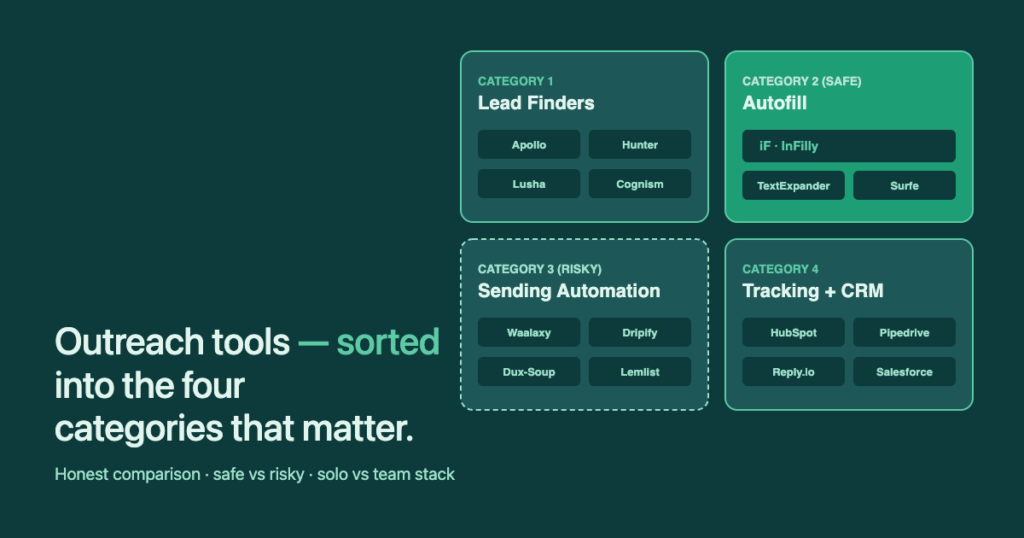
The 4 categories of LinkedIn outreach tools
Every tool listed below fits cleanly into one of these four categories. Most listicles ignore the distinction — and that’s how you end up with a stack of three tools that do the same thing while missing a fourth that you actually need.
| Category | What it does | Safety | Examples |
|---|---|---|---|
| 1. Lead Finders | Surface email + phone for the prospect you’re viewing | Safe | Apollo, Hunter, Lusha, Cognism |
| 2. Message Autofill | Fill template tokens ({first}, {company}) — you still click send | Safe | InFilly, TextExpander, Surfe |
| 3. Sending Automation | Send connection requests + DMs on a schedule, no human click | Risky | Waalaxy, Dripify, Linked Helper, Dux-Soup, Lemlist |
| 4. Tracking + CRM | Log conversations + sync with your sales pipeline | Safe | HubSpot, Pipedrive + Surfe, Reply.io |
Category 1 — Lead Finders
You can’t outreach to people whose contact details you don’t have. This category surfaces verified emails and phone numbers — usually as a Chrome overlay on the LinkedIn profile you’re viewing.
| Tool | Free tier | Paid from | Strength | Weakness |
|---|---|---|---|---|
| Apollo.io | 60 credits/mo | $59/mo | Massive US database; usable free tier | Data quality drops outside US/UK |
| Hunter | 25 searches/mo | $34/mo | Best email verification accuracy | Email-only, no mobile numbers |
| Lusha | 50 credits/mo | $36/mo | Top US mobile-number accuracy (70–80%) | EU data sparse |
| Cognism | None | ~$15k/yr | Phone-verified data, GDPR-clean EU | Enterprise pricing only |
My pick for solo: Apollo free tier first, Hunter when you need higher email accuracy. For EU-heavy outbound where GDPR matters and budget allows, Cognism is the only enterprise option that’s actually compliant rather than dancing around the rules.
Category 2 — Message Autofill (the safe alternative to automation)
This is the underrated category. Autofill tools read the LinkedIn profile you’re on, fill {first}, {company}, {title} into your saved template — and then leave the actual send button for you to click. No bot fingerprint, no risk, but most of the typing tax is gone.
| Tool | Free tier | Paid from | Best for |
|---|---|---|---|
| InFilly | Yes (forever) | $9/mo Pro | LinkedIn-specific autofill, custom tokens |
| TextExpander | 30-day trial | $3.33/mo | Generic text snippets across all apps |
| Surfe | 14-day trial | $40/mo | LinkedIn + CRM sync (Pipedrive, HubSpot) |
Honest disclosure: I built InFilly because of a gap I kept hitting. I’d tried TextExpander for LinkedIn templates and discovered it can’t read the first name off the profile you’re viewing — you still type every name manually. That’s exactly the gap. InFilly fills it: LinkedIn-aware autofill that costs $0 for solo use and $9/mo for Pro.
InFilly reads the LinkedIn profile you’re on and fills {first}, {company}, {title} on your saved template in one click. No automation, no account warnings. Free forever for solo use.
Category 3 — Sending Automation (use with caution)
This category does the most while carrying the most risk. The tools schedule connection requests and DMs to send on your behalf, often combined with email and other channels. They work — until they don’t, at which point your LinkedIn account is restricted, sometimes permanently. I personally know multiple people who lost their accounts to „undetectable“ tools.
I once tested Linked Helper on a separate employee account (not my main profile — I would never risk that). The send volume was high, but about 50% of the auto-queued connections were off-target because automation rewards breadth over precision. Net pipeline contribution after 8 weeks: zero. The lesson stuck: high volume with bad targeting beats no volume with good targeting only if you’re measuring vanity metrics, not revenue.
| Tool | Free tier | Paid from | Strength | Risk |
|---|---|---|---|---|
| Waalaxy | Yes | $50/mo | Multi-channel sequences, polished UX | Account restriction |
| Dripify | 7-day trial | $59/mo | Cloud-based (works while PC off) | Account restriction |
| Linked Helper 2 | 14-day trial | $15/mo | Cheapest of the lot | Browser-based detection |
| Dux-Soup | 14-day trial | $14.99/mo | Most mature; CRM integrations | Long history of restrictions |
| Lemlist | 14-day trial | $69/mo | Email + LinkedIn combined | Same as above on LinkedIn side |
My honest recommendation: if you’re going to use this category, do it on a dedicated non-personal account where there’s nothing irreplaceable to lose. For your main profile — the one with thousands of connections and an actual reputation — pair Category 1 (lead finder) + Category 2 (autofill) and keep the human in the loop.
Category 4 — Tracking & CRM
LinkedIn gives you no native outreach analytics. No „messages sent“ count, no reply rate, no funnel. So you either bolt one of these tools onto LinkedIn or, like I did for years, count manually with a spreadsheet. The right CRM here depends mostly on what you already use.
| Tool | Free tier | Paid from | Best for |
|---|---|---|---|
| HubSpot | Yes (limited) | $15/mo seat | Already-on-HubSpot teams; native LinkedIn logging |
| Pipedrive + Surfe | 14-day trial | $15 + $40/mo | Existing Pipedrive users — Surfe pushes LinkedIn convos in |
| Reply.io | No | $59/mo | Multi-channel sequence tracking |
One honest note about Surfe specifically: I use it for the Pipedrive sync — that’s the reason I originally bought it. The message-template feature is genuinely useful, but the bundle costs more than my CRM itself. Several hundred euros a year for what amounts to a CRM-sync button plus templates. The math only works if the CRM sync is critical to you. If not, there are cheaper tools that do each piece individually.
The complete tool comparison table
| Tool | Category | Free? | Paid from | Account-safe |
|---|---|---|---|---|
| InFilly | Autofill | Yes | $9/mo | Yes |
| Apollo.io | Lead finder | 60 credits/mo | $59/mo | Yes |
| Hunter | Lead finder | 25/mo | $34/mo | Yes |
| Lusha | Lead finder | 50/mo | $36/mo | Yes |
| Cognism | Lead finder | No | ~$15k/yr | Yes |
| TextExpander | Autofill | 30-day trial | $3.33/mo | Yes |
| Surfe | Autofill + CRM | 14-day trial | $40/mo | Yes |
| Sales Navigator | Search | 30-day trial | $119.99/mo | Yes |
| Waalaxy | Sending automation | Yes | $50/mo | Caution |
| Dripify | Sending automation | 7-day trial | $59/mo | Caution |
| Linked Helper 2 | Sending automation | 14-day trial | $15/mo | Caution |
| Dux-Soup | Sending automation | 14-day trial | $14.99/mo | Caution |
| Lemlist | Sending automation | 14-day trial | $69/mo | Caution |
| HubSpot | CRM | Yes | $15/mo seat | Yes |
| Reply.io | Tracking | No | $59/mo | Yes |
Best stack for solo founders ($0–30/month)
- Free LinkedIn with Boolean search for prospecting.
- Apollo free tier (60 credits/month) for emails.
- InFilly free for template autofill.
Total monthly cost: $0. This is exactly the stack I started with. It scales cleanly to about 30 qualified conversations per month, which is more than enough pipeline for most solo founders.
Best stack for SDR teams ($150–500/seat/month)
- Sales Navigator Core ($119.99) for unrestricted prospecting.
- Apollo paid ($59) for verified emails at scale.
- InFilly Pro ($9) for autofill across the team.
- HubSpot or Pipedrive ($15+) for CRM logging.
- Optionally: Lemlist or Reply.io ($59+) for multi-channel sequences — but route sends through email, not LinkedIn, to keep account safety intact.
Total: $200–500/seat depending on how much CRM/sequence functionality you layer on. Notice what’s NOT in this stack: Waalaxy / Dripify / Linked Helper. The account-restriction risk is the wrong trade-off when a seat costs you $200+ and your sales cycle depends on the rep’s LinkedIn reputation.
Best stack for enterprise ($800+/seat/month)
- Sales Navigator Advanced ($159.99) — CRM sync.
- Cognism (~$1.5k/seat/yr) — GDPR-compliant EU contact data.
- Salesforce or HubSpot Enterprise ($150+) — pipeline + reporting.
- InFilly Pro ($9) on every rep’s browser.
- Surfe or Reply.io ($40+) for multi-channel orchestration.
This stack is for organizations where compliance, attribution, and reporting matter as much as raw output. The Cognism line item is what pushes it past $800; everything else is roughly the same as the SDR-team stack.
My honest take after 6 years of LinkedIn outreach
I’ve generated multiple six figures in revenue from LinkedIn outreach without a single automation tool on my main profile. My profile has thousands of followers and is my single most valuable business asset. Asking „what’s the cheapest tool that automates this?“ is the wrong question if your LinkedIn account is the thing actually generating the revenue. The right question is: „what’s the most expensive minute of typing I can replace without putting the asset at risk?“ That question lands you on a lead finder + autofill stack every time.
I’ve also tested every major AI message-writing tool — Claude, ChatGPT, Gemini — for generating LinkedIn DMs. Generic prompts produce generic garbage: every. single. time. The only way AI writing works is if you write a prompt so specific that you might as well have just written the message yourself. So I don’t pay for AI message tools. I pay for autofill that fills proven templates correctly. The math works out.